- Getting started
What do I need?
Installation and setup
Updating MultiViewer
Understanding telemetry
FAQ
- Usage
Authentication
Keyboard shortcuts
Syncing streams
Player context menu
Race Trace
- Configuration
Setups
- Troubleshooting
DRM/playback issues
- Privacy
App analytics
DRM/playback issues
Sometimes, MultiViewer doesn't work out of the box for users. There are a few scenarios that have happened before, with the solution documented below:
When I open a stream, the window stays black
- You may be streaming your content (for instance using AirPlay mirroring, or using an iPad as an external display). This isn't supported for DRM protected streams right now.
- You may be using an unsupported cable, hub or display. Your display should support HDCP for DRM to work properly.
- You could be having an intermittent issue we haven't been able to diagnose yet. Go to Settings › Advanced › Troubleshooting (in older versions, the Danger area at the bottom of Settings) and press
Reset Widevine and restart. That clears the Widevine CDM and the app's caches, then restarts MultiViewer. Your settings, setups and sign-in stay where they are. - If you upgraded from an earlier version, you may be able to fix the black screens by signing out in the older version, then signing in in the new one.
- As a last resort, if the Widevine reset didn't help, quit the app and remove the app's data directory (
%APPDATA%/MultiVieweron Windows,~/Library/Application Support/MultiVieweron macOS,~/.config/MultiVieweron Linux), then open the app again. This wipes everything, including your settings, setups, sign-in and logs.
Unstable playback, stuttering or excessive frame drops
If you're on Windows you may be able to resolve this by disabling VSync and frame rate limiting.
NVIDIA
- Open the NVIDIA App and go to
Graphics→Program Settings. - Pick MultiViewer from the list. If it isn't there, open the three dots of the programs list and choose
Add a program. - Under
Driver Settings, turn offVertical SyncandMax Frame Rate. Background Application Max Frame Rateis a global setting, so switch to theGlobal Settingstab, scroll to the bottom, clickShow Legacy Settings, and turn it off there.- Restart the app.
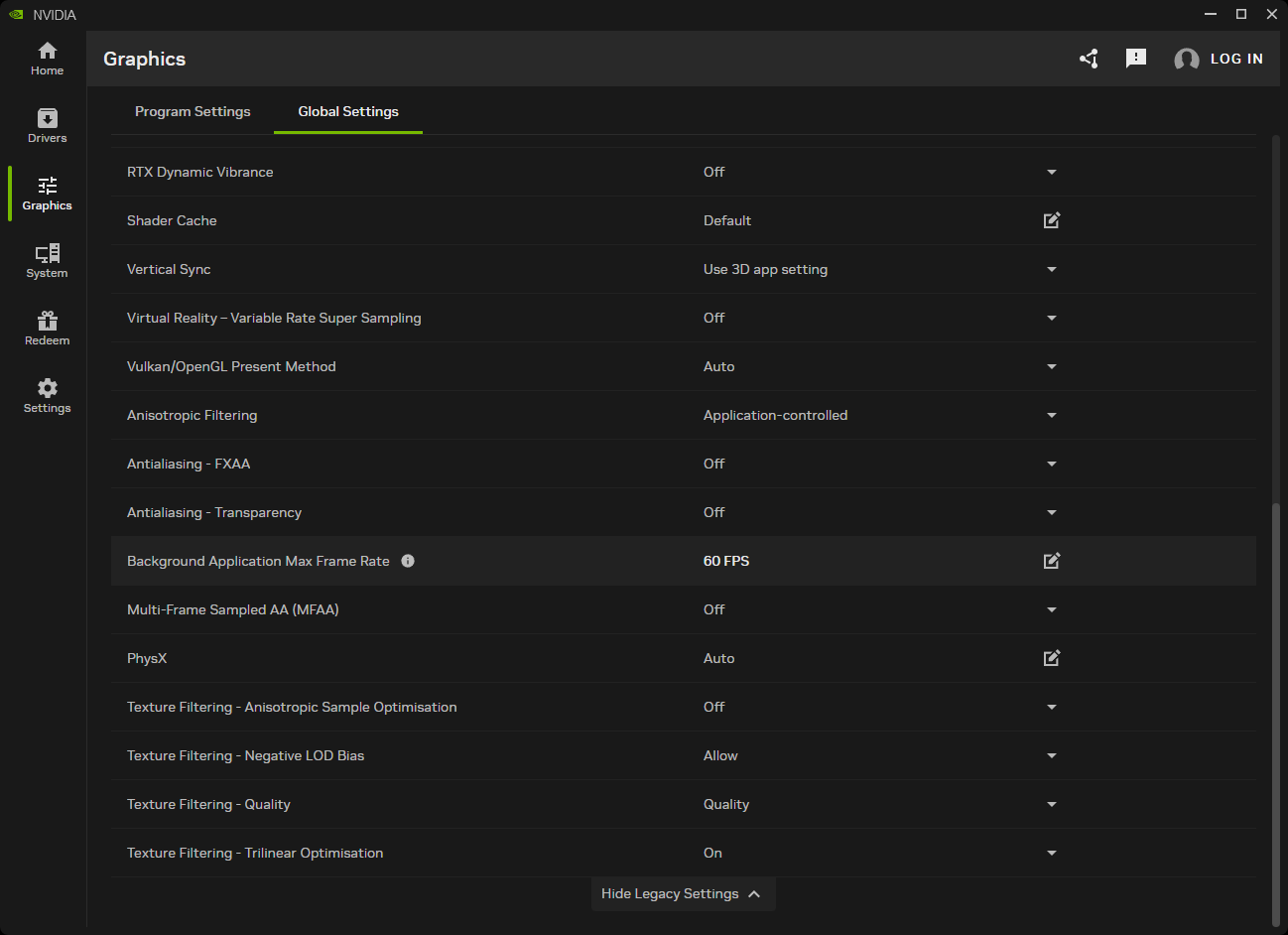
NVIDIA retired the Control Panel in May 2026, from driver 610.47 onwards. If you're on an older driver, or you upgraded in place and still have it, the same settings live under 3D Settings → Manage 3D Settings → Program Settings.
AMD
- Open the AMD Radeon Software (right click on your desktop, click
Show more options→AMD Radeon Software) - Go to the
Gamingor theGraphicstab in the menu bar - Either system-wide or per application, disable
Wait for Vertical Refresh,Radeon™ ChillandMax Frame Rate/Frame Rate Target Control - Click Apply and restart the app.
Finally, make sure Use hardware acceleration, under Settings › Advanced › Performance (in older versions, under Experimental settings), is turned on.
The player keeps 'loading'
The player has scrollbars
- Hide the telemetry by pressing T
- Zoom out the window by pressing Cmd+minus, Ctrl+minus or Ctrl+Shift+minus (not numpad minus)
- Increase the size of the player
Did you not find the solution to your issue?
You can always join our community and ask for help there:
MultiViewer is an unofficial app and is not associated in any way with the Formula 1 companies. F1, FORMULA ONE, FORMULA 1, FIA FORMULA ONE WORLD CHAMPIONSHIP, GRAND PRIX and related marks are trade marks of Formula One Licensing BV. Watching F1 TV content in MultiViewer requires a paid F1 TV subscription, and MultiViewer doesn't help circumvent any content protection or limitations by F1 TV. MultiViewer is a non-commercial, fan-made application. Data is used for non-commercial, fair use. All product, team and company names are trademarks™ or registered® trademarks of their respective holders. Use of them does not imply any affiliation with or endorsement by them. Any product names, logos, brands, and other trademarks or images featured or referred to within the app are the property of their respective trademark holders. These trademark holders are not affiliated with MultiViewer or its contributors. They do not sponsor or endorse MultiViewer or any of our products.